
New download: CpidCertHelper
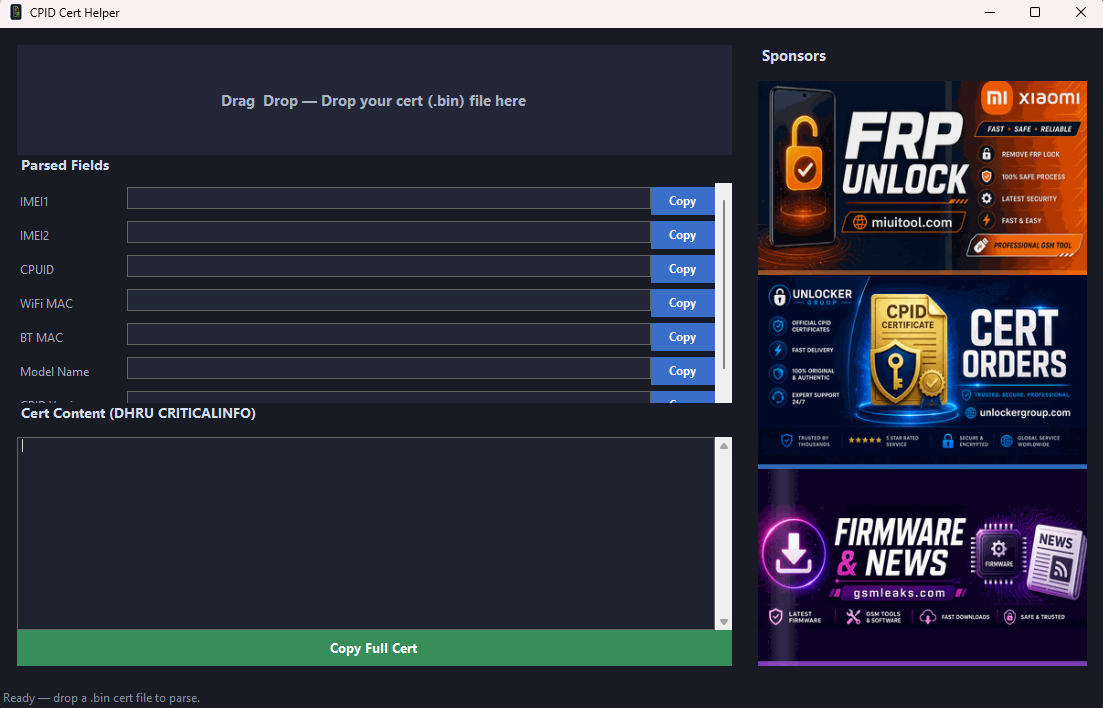
CPID Cert Helper is a lightweight, free Windows utility for technicians who work with Xiaomi CPID certificate files. Instead of opening certs in a hex editor or copying fields by hand, you can drop your .bin file into the app and get clean, ready-to-use values in seconds.
How it works
- Download and run
CpidCertHelper.exeon Windows (64-bit). - Drag and drop your CPID cert file (
.bin) onto the window. - The tool automatically parses and displays:
- IMEI 1 & IMEI 2
- CPUID
- WiFi MAC & Bluetooth MAC
- Model name
- Use the Copy buttons next to each field, or click Copy Full Cert to copy the complete CRITICALINFO block formatted for DHRU / reseller order systems.
Who is it for?
- GSM unlock shops and resellers placing CPID cert orders via DHRU
- Technicians who need quick access to cert fields without manual parsing
- Anyone who wants a simple, local cert reader — no upload, no account required
Requirements
- Windows 10 / 11 (64-bit)
- .NET 9 Desktop Runtime (x64) — install once if the app does not start
- Your Xiaomi CPID cert file (
.bin)
Notes
- The app runs locally on your PC; your cert is not sent to any server for parsing.
- Built-in auto-update checks for new versions on startup.
- Small download size (~500 KB) — no heavy installer.
Disclaimer: This tool only reads and formats certificate data. Use certs only on devices you own or are authorized to service.